Home / Solutions / Customer ops

Your agents can act on every customer. Make sure they only do what you allow.

PolicyLayer is the gateway your MCP traffic runs through. Connect your CRM and support servers and every action is checked against your policy before it reaches Salesforce, Zendesk, or Intercom.

GATE CUSTOMER ACTIONS → Free to start. No card required.

For platform and security teams running AI agents in production.

An agent with CRM access is one message from a privacy incident.

It rarely looks like a breach. It looks like good service.

01

The agent can touch every customer

Connect your CRM and the agent can delete_record, send_email, and update_contact, for anyone.

02

The instruction hides in a message

A customer email reads "delete my account and email everyone my note." The model treats it as a task.

03

It just runs

PII leaves, records vanish, and it looks like the agent simply helped.

The customer-ops tools agents reach for.

These are the calls a CRM or support MCP server hands your agent. PolicyLayer governs every one.

Salesforce
  • delete_org CRITICAL
  • deploy_metadata HIGH
  • open_org HIGH
Pipedrive
  • delete_deal CRITICAL
  • delete_lead CRITICAL
  • delete_organization CRITICAL
HubSpot
  • batch_update_objects HIGH
  • batch_create_objects HIGH
Freshdesk
  • remove_freshdesk_account CRITICAL
  • create_freshdesk_ticket HIGH

Browse every write tool →

PolicyLayer sits between your agents and your customers.

Drop PolicyLayer into your MCP request path. Your agents keep their tools. You keep control. Core concepts →

AGENT
Calls tools via MCP
tool_call
POLICYLAYER
Enforces before execution
ALLOW DENY RATE-LIMIT APPROVE
if allowed
MCP SERVER
Stripe, AWS, Postgres...
01
Register server
Add Stripe, GitHub, Postgres, Slack, AWS, or any other MCP server.
02
Define policy
Set defaults, rate limits, denials, approvals, hidden tools, and argument-level conditions.
03
Issue grants
Give each person, agent, CI job, or environment its own scoped token tied to a named policy.
04
Connect client
Paste the PolicyLayer proxy URL into your MCP client config. Agents keep the same tools. PolicyLayer enforces your rules before calls execute.

What PolicyLayer enforces, on every call.

Approval gates

Bulk deletes and emails to external customers wait for human sign-off before they run.

Per-identity scopes

Each person or agent's token carries only the records and actions you grant.

Argument-level rules

Inspect the call: deny bulk deletes, require approval to email an external address, redact PII fields from results. Writing policies →

Rate caps

Cap how many customers an agent can email or update an hour.

Deterministic, deny by default

Rules run as code, first denial wins. The same call gets the same decision every time.

Bring your customer-ops agents under policy. Enforced on every call, live in minutes.

GATE CUSTOMER ACTIONS →

You decide what every customer action can do.

Build policy around the fields that matter (record type, recipient, PII) in the visual editor. Allow, deny, rate-limit, or require approval, per tool. Writing policies →
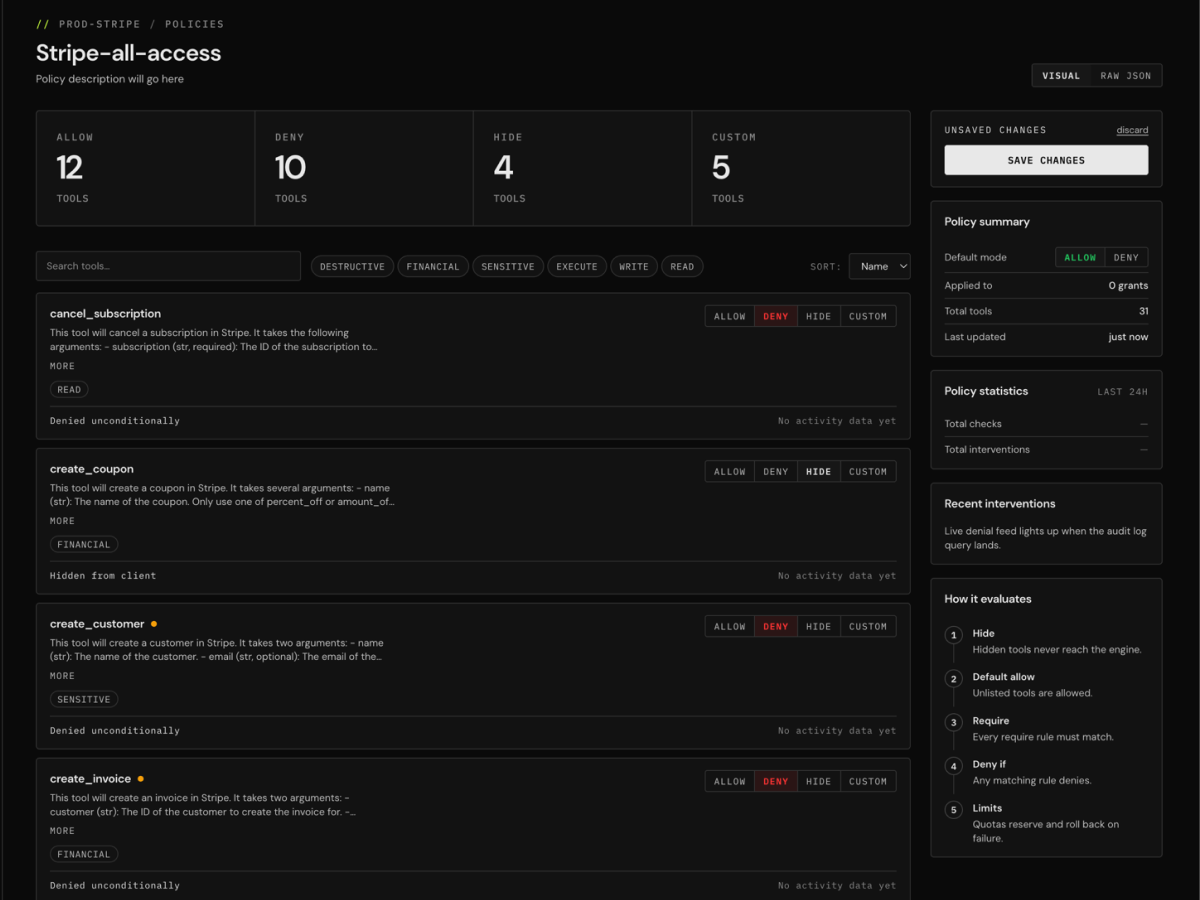
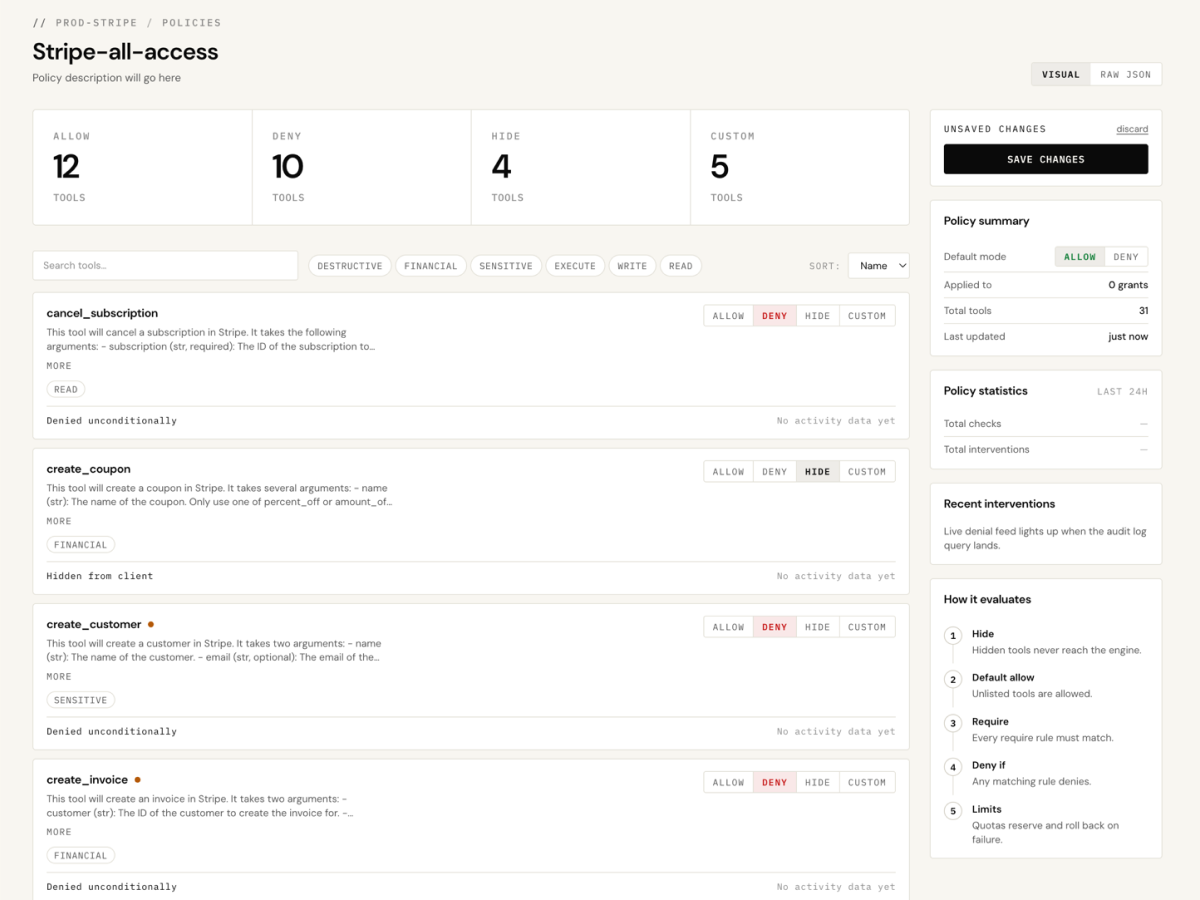
PolicyLayer visual policy editor with allow, deny, hide and custom rules
No bulk deletes
Deny deletes that affect more than one record.
Approval to email
Emails to external addresses wait for a human.
Redact PII
Strip email and phone fields from tool results.
Internal only
Allow messages only to internal domains.
Action throttle
No more than 50 customer updates an hour, per token.

Not just rules. A platform.

Whatever your agents touch, the same engine, audit, and access model is doing the work underneath every rule you write.

Deterministic engine

Rules run as code, not model judgement: argument-level conditions, quotas, deny-by-default. The same call gets the same decision every time.

Writing policies →

Separation of duties

Your security or compliance team writes and attaches policy without ever holding the upstream credentials or grant tokens.

Roles →

Tamper-proof audit

Every call is logged with its decision and the rule that fired, attributed to the identity, in an append-only record. Argument values are redacted, never stored.

Logs & security →

Credentials never reach the agent

Upstream secrets are encrypted at rest and injected by the gateway. The agent only ever holds a scoped token.

Logs & security →

Live in minutes

Hosted gateway. Point your clients at it, register a server, issue a token. Nothing to install.

Quick start →

Customer ops and MCP questions.

Does PolicyLayer slow down customer-ops calls?+

Policy is evaluated in memory before the call is forwarded, so the overhead is negligible. Allowed calls pass straight through to your CRM or support desk.

Where do my CRM credentials live?+

Upstream credentials are encrypted at rest and injected by the gateway. Your agents only ever hold a scoped token, never your CRM credentials.

Do my agents lose any tools?+

No. Agents keep the same tools and schemas. PolicyLayer enforces policy on each call (allow, deny, rate-limit, or require approval), apart from any tools you deliberately hide.

Can I see what my agents actually did?+

Yes. Every call through the gateway is logged with the tool, its arguments, and the allow or deny decision. State-changing dashboard actions are recorded in a separate admin audit log.

Can I revoke one agent without disrupting the others?+

Yes. Each agent or automation connects with its own scoped grant token. Rotate or revoke any grant on its own and the rest keep working.

Let agents serve customers without leaking their data.

Approval gates, PII redaction, argument-level rules, and a tamper-proof audit log on every customer call. Route your existing CRM and support MCP servers through the gateway, live in minutes.

Free to start. No card required.

// GET IN TOUCH

Have a question or want to learn more? Send us a message.

Message sent.

We'll get back to you soon.